
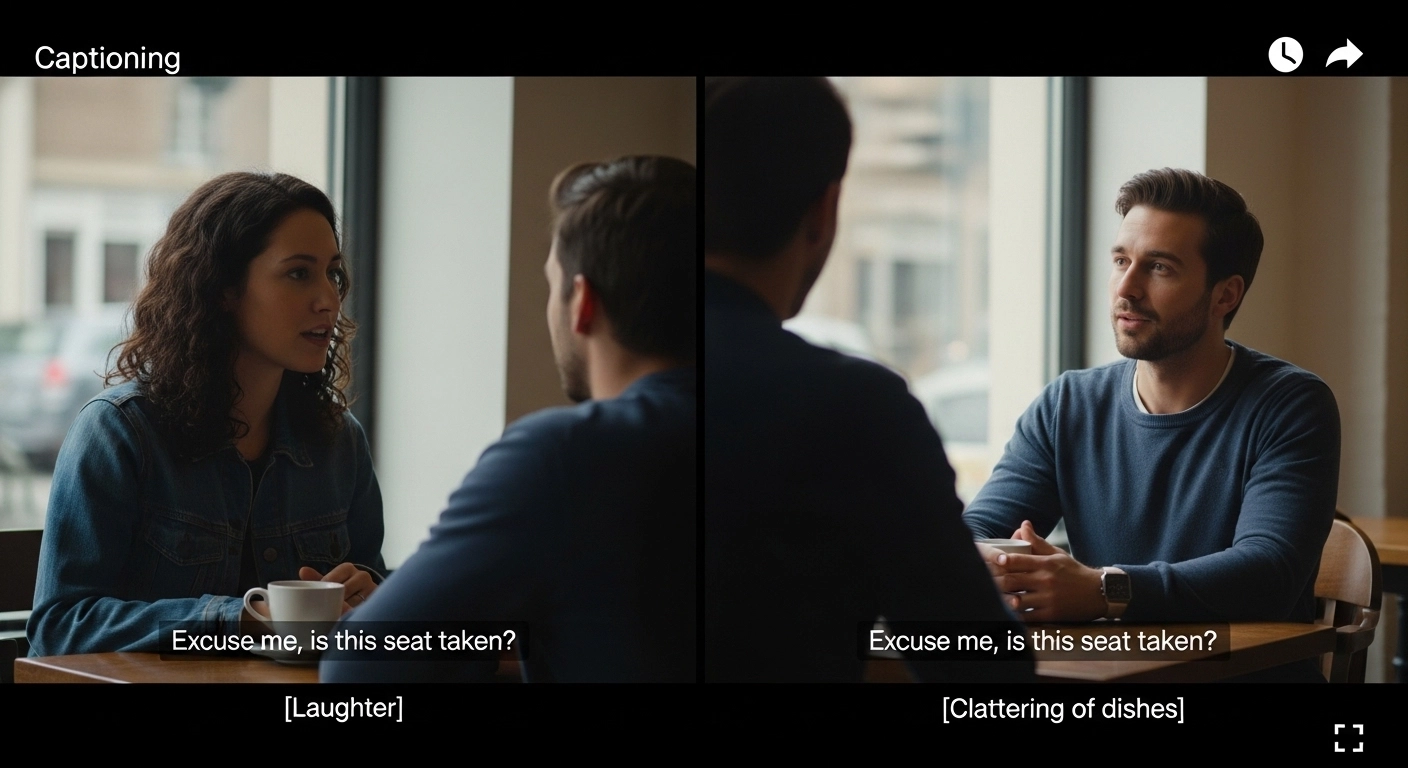
If you’ve ever uploaded a video to Instagram, YouTube, Netflix, or even a WhatsApp status, you’ve probably seen both terms: captions and subtitles.
Most people use them interchangeably.
They’re not the same.
Understanding captioning vs subtitles isn’t just a technical detail. It affects accessibility, engagement, watch time, audience trust, and even how algorithms treat your content
. Whether you’re a content creator, brand owner, educator, or casual scroller who just wants to understand what’s happening on screen, knowing the difference gives you an edge.
Let’s break it down in a human, practical way no robotic definitions, no corporate jargon just clear insights you can actually use.
What Is Captioning? 🎧
Captioning is text on screen that represents all relevant audio in a video.
Not just dialogue.
It includes:
-
Spoken words
-
Background sounds
-
Music cues
-
Tone indicators
-
Sound effects
Example:
[Door slams]
Sarah: “I didn’t mean to hurt you.”
[Soft piano music playing]
That’s captioning.
Captions are primarily designed for deaf and hard-of-hearing audiences, but they also help anyone watching without sound.
There are two main types:
-
Closed captions (CC) – Can be turned on/off
-
Open captions – Burned into the video permanently
What Are Subtitles? 🌍
Subtitles are text translations of spoken dialogue.
They focus only on speech.
They usually do not include:
-
Sound effects
-
Background noise
-
Emotional tone indicators
Example:
Original audio: Spanish
Subtitle: English translation of spoken dialogue only.
Subtitles are primarily used for:
-
Translating foreign-language content
-
Helping viewers understand dialogue in noisy accents
So when comparing captioning vs subtitles, the biggest difference is this:
Captions = everything you hear
Subtitles = what is being said
Captioning vs Subtitles: The Core Differences Explained Simply
Here’s the clean comparison:
| Feature | Captioning | Subtitles |
| Includes sound effects | Yes | No |
| Includes music cues | Yes | Rarely |
| Includes speaker identification | Yes | Usually no |
| Designed for accessibility | Yes | Not primarily |
| Used for translation | Sometimes | Yes |
The intent is different.
The audience need is different.
The impact is different.
Why Captioning vs Subtitles Matters for Accessibility ♿
Accessibility isn’t optional anymore. It’s expected.
Over 5% of the world’s population experiences disabling hearing loss. That’s hundreds of millions of people.
If you’re using subtitles instead of captions for English content, you’re potentially excluding people who rely on:
-
Sound descriptions
-
Tone markers
-
Environmental cues
Accessibility-first content performs better long term because:
-
It’s inclusive
-
It builds trust
-
It increases shareability
-
It expands your reach
And platforms are paying attention.
Social Media Reality: Most People Watch Without Sound 📱
Here’s the part most creators ignore.
On Instagram, TikTok, Facebook, and LinkedIn:
-
A massive percentage of users scroll with sound off.
-
They’re in public.
-
They’re multitasking.
-
They’re at work.
If you rely only on audio, your message dies silently.
Captions increase:
-
Watch time
-
Retention
-
Completion rate
-
Engagement
In the captioning vs subtitles debate for social media, caption-style text almost always wins because it keeps viewers engaged even without sound.
Closed Captions (CC) vs Open Captions
Closed Captions:
-
Optional
-
Platform-controlled
-
More flexible
-
Better for streaming platforms
Open Captions:
-
Permanently embedded
-
Cannot be turned off
-
Ideal for social feeds
-
Safer for mobile-first content
For Instagram Reels or TikTok?
Open captions are often better.
For Netflix or YouTube?
Closed captions are standard.
SEO & Searchability: Do Captions Help Rankings? 🔍
Yes.
Search engines crawl:
-
Video descriptions
-
Metadata
-
Transcripts
Captions can generate transcripts.
Transcripts increase:
-
Keyword indexing
-
Search discoverability
-
Featured snippet potential
-
AI overview inclusion
If you’re serious about long-term growth, captioning vs subtitles isn’t just about accessibility — it’s about search visibility.
AI-Generated Captions vs Manual Captions
Auto-captions are improving.
But they still:
-
Misinterpret names
-
Miss tone
-
Fail with accents
-
Ignore sound cues
Manual captions:
-
Improve clarity
-
Enhance brand voice
-
Build professionalism
For high-stakes content? Manual wins.
For casual daily posts? Auto is acceptable — but review it.
Legal Differences: When Captions Are Required ⚖️
In many countries:
-
Broadcast TV requires closed captioning.
-
Government content must be accessible.
-
Educational institutions must comply with accessibility laws.
Subtitles alone often do not meet accessibility standards.
So legally speaking:
Captioning is compliance.
Subtitles are translation.
Engagement Psychology: Why Text On Screen Changes Behavior 🧠
When viewers read and watch at the same time:
-
Cognitive retention increases.
-
Message clarity improves.
-
Emotional tone is reinforced.
-
Drop-off rates decrease.
Text anchors attention.
In the captioning vs subtitles context, captioning keeps the brain stimulated through multi-sensory reinforcement.
That’s powerful.
When to Use Captions Instead of Subtitles
Use captions when:
-
Your audience speaks the same language.
-
Accessibility matters.
-
Social media distribution is key.
-
You want higher retention.
-
You’re building brand authority.
When to Use Subtitles Instead of Captions
Use subtitles when:
-
Translating foreign-language content.
-
Distributing international media.
-
Producing films or documentaries.
-
Reaching multilingual audiences.
Sometimes the best answer in captioning vs subtitles isn’t choosing one — it’s using both.
The Hybrid Strategy: Captions + Subtitles Together 🌐
Example:
Original video in Korean
English subtitles for translation
Closed captions available for sound cues
That’s maximum inclusivity.
Big streaming platforms do this for a reason.
It increases:
-
Global reach
-
Accessibility
-
Viewer satisfaction
Common Mistakes People Make
-
Thinking subtitles = captions
-
Forgetting speaker identification
-
Ignoring background sound
-
Using tiny unreadable fonts
-
Overcrowding the screen
-
Trusting auto-captions blindly
These mistakes reduce credibility instantly.
Formatting Best Practices
For effective captions:
-
Use 1–2 lines max.
-
Keep reading speed realistic.
-
Avoid giant blocks of text.
-
Sync precisely with audio.
-
Use clear fonts.
-
Maintain contrast.
For subtitles:
-
Focus on clean translation.
-
Keep tone accurate.
-
Avoid literal word-for-word awkwardness.
-
Maintain cultural context.
Real-World Examples
Netflix:
-
Offers both subtitles and closed captions.
YouTube:
-
Auto-generates captions but allows manual edits.
Instagram:
-
Auto captions for Reels, but open captions perform better visually.
Educational platforms:
-
Often legally required to provide full captioning.
Captioning vs Subtitles for Businesses
If you run:
-
A coaching business
-
An e-commerce brand
-
A SaaS product
-
An educational platform
Captions increase:
-
Clarity
-
Professionalism
-
Accessibility
-
Conversions
Subtitles expand global reach.
Smart brands do both.
The Future of Captioning and Subtitles 🤖
AI will:
-
Improve accuracy
-
Enable live translation
-
Auto-detect tone
-
Personalize viewing preferences
But human editing will remain essential for nuance.
Because tone, emotion, sarcasm?
AI still struggles.
Quick Answer (Featured Snippet Ready)
What is the difference between captioning and subtitles?
Captioning includes all audio elements (dialogue, sound effects, music cues) and is designed for accessibility. Subtitles display only spoken dialogue and are mainly used for language translation.
Final Thoughts: Why Captioning vs Subtitles Isn’t Just Technical
At first glance, it seems small.
Just text on screen.
But in reality, captioning vs subtitles influences:
-
Who can access your content
-
How long people watch
-
Whether they understand tone
-
Whether your message lands
Captions build inclusion.
Subtitles build global connection.
Together?
They build reach.
If you create content in 2026 and beyond, this isn’t optional knowledge. It’s foundational.
The creators who understand accessibility win.
The brands who prioritize clarity win.
The educators who support every learner win.
So next time you upload a video, ask yourself:
Am I just adding text?
Or am I opening the door wider?
Because when you get captioning vs subtitles right, you don’t just improve a video.
You improve the experience.

Stephen King horror aur thriller novels ke king kehlate hain. Unki famous books mein It, The Shining, aur Carrie shamil hain. Unki kahaniyon par kai movies bhi bani hain.